
Quickstart
The essentials to add Goodays reviews to your point of sale pages with the GEO fragment API. This page stays short on purpose: each step links to the section of the documentation that covers it in detail.
Before you startThe GEO fragment API is available with your Goodays subscription and is not enabled by default. Reach out to your Goodays project contact to enable it and get your universe ID. See Prerequisites.
1. The principle
For each point of sale, your server requests a ready-to-use block of HTML (rating, latest reviews and JSON-LD) and inserts it as-is into the point of sale page, before sending the page to the browser.
Why server-side? AI crawlers (ChatGPT, Perplexity, etc.) don't execute JavaScript: a block added in the browser stays invisible to them.
In the documentation: How it works
2. The target rendering
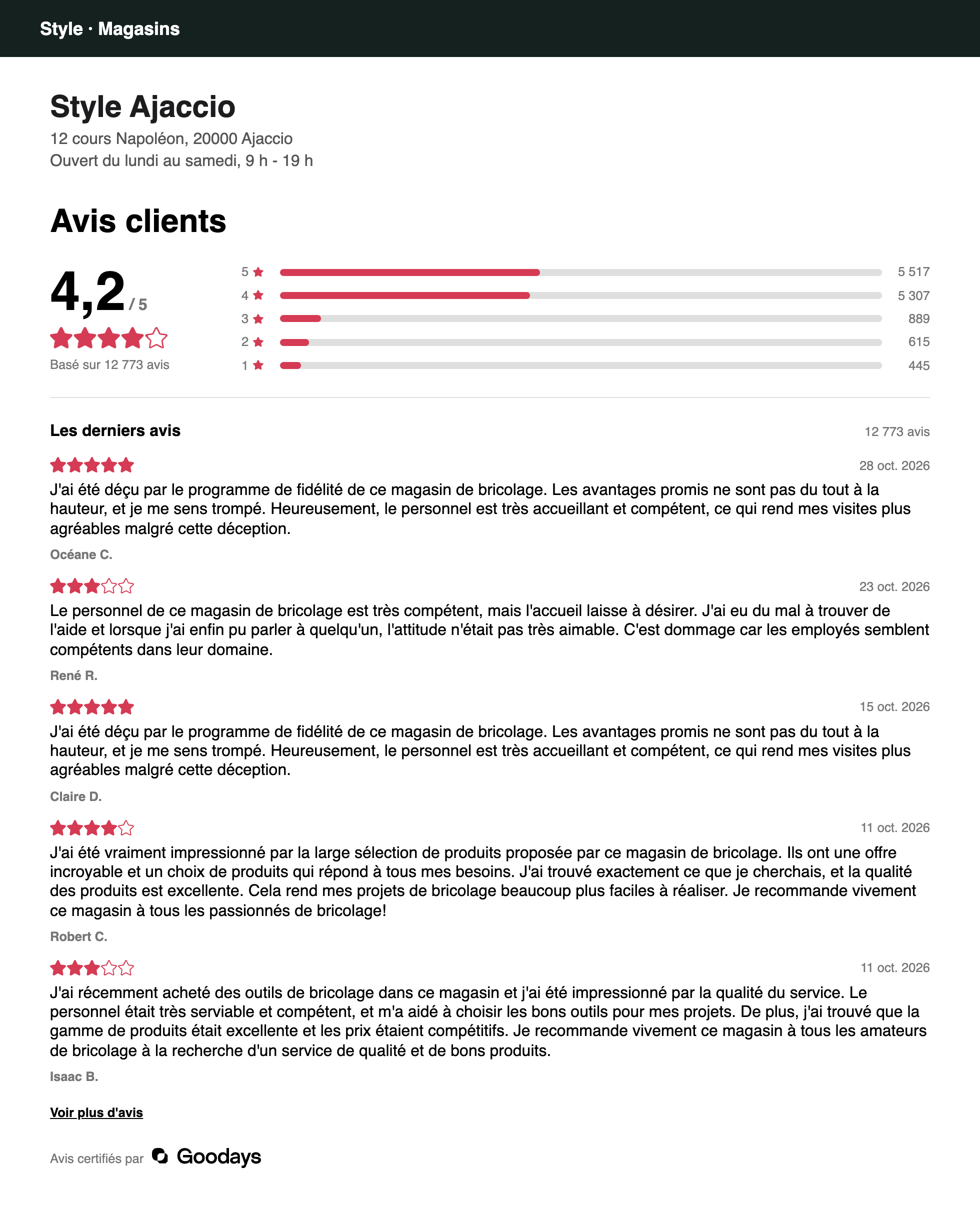
The fragment on the page of the Style Ajaccio point of sale (049). Goodays styles it to your brand guidelines by default. See Customize HTML rendering.
3. The call
GET https://geo.goodays.co/clients/{universe_id}/{external_id}| Param | Value |
|---|---|
universe_id | Your universe ID, provided by your Goodays project contact. In the examples below: style-style |
external_id | The external ID of the point of sale, exactly as in your Goodays account, leading zeros included: 049, not 49 |
| Authentication | None, no token to manage |
| Server-side | Required: the GEO fragment API doesn't send CORS headers, so a call from the browser is blocked |
| During development | Add ?live=true: you get live data, without cache, with a "Development preview" badge. Remove it in production |
In the documentation: Endpoint & params · Environments · Prerequisites
Demo points of sale
Style is our demo brand. You can call its fragments right away to test your integration:
| External ID | Point of sale | Live demo |
|---|---|---|
049 | Style Ajaccio | /clients/style-style/049?live=true |
008 | Style Bordeaux | /clients/style-style/008?live=true |
029 | Style Rennes | /clients/style-style/029?live=true |
033 | Style Nantes | /clients/style-style/033?live=true |
999 | Unknown point of sale | /clients/style-style/999?live=true: returns a 404, useful to test this case |
4. The responses
| Status | What it means | What you do with it |
|---|---|---|
200 | The fragment (text/html, UTF-8) | Insert it as-is |
304 | Nothing has changed since your last request | Keep serving your cached copy |
404 | Unknown universe ID or external ID | Render the page without reviews (never display the response body) |
In the documentation: Responses
5. The integration rules
Cache the fragment for 24 hours
Don't call the GEO fragment API on every page view. Keep each point of sale's fragment on your side and request it again once a day. If the fragment hasn't changed, the response is a 304 and you keep your copy. If the GEO fragment API doesn't respond, keep showing your copy, for up to 7 days.
In the documentation: Step 2: Cache the fragment · Cache fragments locally · Fail gracefully
Never wait more than 2 seconds
Limit the wait to 1 second for the connection and 2 seconds for the response. If it takes longer, render the page without reviews: the fragment must never block your page.
In the documentation: Set short timeouts · Recommended values
Insert the fragment as-is
Insert the HTML you receive without changing it. Most template engines escape HTML by default, so output it as raw HTML (for example |safe in Twig or Jinja, {!! !!} in Blade). Don't remove or move any part of the fragment.
In the documentation: Step 3: Insert the response · Insert the fragment correctly
One fragment per page
Each point of sale page shows the fragment of its own point of sale, and only one. If the page already contains a rating of the point of sale in structured data (AggregateRating), remove it: otherwise Google and AI assistants see two ratings that contradict each other.
In the documentation: Avoid duplicate structured data
Allow our resources
The fragment loads a stylesheet from cdn.goodays.co and contains a little CSS and JavaScript directly in the HTML. If your website enforces a strict Content Security Policy (CSP), these must be allowed: contact your Goodays project contact and we will review it together.
In the documentation: Security
To save time, the documentation provides sample code that already handles caching, ETag and fallback: Python, Node.js, PHP. It is optional, a starting point. The checklist is also useful before going live.
6. Verification
To see what an AI crawler actually receives (without JavaScript), run this command on one of your point of sale pages. It must print 2:
curl -s -A "GPTBot" "https://www.example.com/stores/ajaccio" | grep -oE 'class="goodays-summary"|"aggregateRating"' | grep -c ''You can also check the page with the Schema Markup Validator: you must see a LocalBusiness with aggregateRating and review, with no error.
In the documentation: Step 4: Verify implementation
Updated about 23 hours ago