
Integration guides
Prerequisites
Before you implement, complete the following steps:
- The Goodays GEO fragment API is available with your Goodays subscription, and it is not enabled by default. Reviews are published only once your company has agreed to their publication. Reach out to your Goodays project contact to make sure the feature is enabled for your account.
- Universe ID: the identifier of your universe (one of your brands), given by your Goodays project contact.
- External ID: your own code for the point of sale whose reviews you want to display (for example your store code). Confirm it with your Goodays project contact if you are unsure. External IDs are case-sensitive.
- Brand guidelines: share your colors, fonts and, if you have one, a mockup with your Goodays project contact. Goodays uses them to set up the stylesheet of your fragments.
Environments
On the page where you want to integrate the fragment, implement logic to call the Goodays GEO fragment API.
The API base URL is https://geo.goodays.co/.
Live mode for developmentBy default, the API serves cached content regenerated every 24 hours, for maximum reliability and performance on your website.
Add
live=trueto the query string to disable caching and render the fragment with live data, for examplehttps://geo.goodays.co/clients/style-style/049?live=true. Use live mode for development only: remove theliveparameter in production.In live mode, the fragment starts with a "Development preview" badge. Live mode also ignores the case of the external ID, cached content does not: before going live, test once without
live=true.
Implement server-side API call
Server-side onlyCall the API from your server and include the fragment in the HTML your server returns. AI crawlers don't execute JavaScript: a fragment injected in the browser is invisible to them. Our API doesn't send CORS headers, so browser calls are blocked anyway.
Endpoint & params
GET https://geo.goodays.co/clients/{universe_id}/{external_id}| Params | Value |
|---|---|
| Endpoint | https://geo.goodays.co/clients/{universe_id}/{external_id} |
| HTTPS method | GET |
| Required Path Params | universe_id: your universe IDexternal_id: the external ID of the point of sale, case-sensitive |
| Optional Query Params | live: set to true to disable caching. For development only |
Responses
| Status | Content-Type | Meaning | What to do |
|---|---|---|---|
200 | text/html, UTF-8 | The fragment | Insert it as-is into your page |
304 | none | Unchanged since your conditional request (If-None-Match or If-Modified-Since) | Keep serving your cached copy |
404 | application/xml | Unknown universe ID or external ID | Render the page without reviews. Never insert the response body |
Every 200 response carries ETag and Last-Modified headers: use them to revalidate your cached copy at almost no cost. See Integration best practices.
Step 1: Implement server-side API call
For this example we will use the following values:
| Parameter | Value |
|---|---|
| universe_id | style-style |
| external_id | 049 |
style-style is the Goodays demo universe (Style, a fictitious brand): every example on this page works as-is, so you can try it before using your own values.
Sample requests
Below are minimal requests for the main languages. They set a short timeout and only keep a valid HTML response.
In production, add a local cache. Our ready-to-use clients for Python, Node.js and PHP handle caching, revalidation and fallback for you.
curl --location "https://geo.goodays.co/clients/style-style/049"// Node.js 20+ (native fetch)
const universeId = 'style-style';
const externalId = '049';
const url = `https://geo.goodays.co/clients/${encodeURIComponent(universeId)}/${encodeURIComponent(externalId)}`;
async function getFragment() {
try {
const response = await fetch(url, { signal: AbortSignal.timeout(2000) });
const isHtml = response.headers.get('content-type')?.startsWith('text/html');
return response.ok && isHtml ? await response.text() : null;
} catch {
return null; // timeout or network error: render the page without reviews
}
}
const htmlFragment = await getFragment();# uv add requests (or: pip install requests)
from urllib.parse import quote
import requests
universe_id = "style-style"
external_id = "049"
url = f"https://geo.goodays.co/clients/{quote(universe_id, safe='')}/{quote(external_id, safe='')}"
def get_fragment():
try:
response = requests.get(url, timeout=(1, 2)) # connect, read (seconds)
except requests.RequestException:
return None # timeout or network error: render the page without reviews
is_html = response.headers.get("Content-Type", "").startswith("text/html")
if response.status_code == 200 and is_html:
return response.content.decode("utf-8") # the fragment is UTF-8
return None
html_fragment = get_fragment()<?php
// composer require guzzlehttp/guzzle
use GuzzleHttp\Client;
use GuzzleHttp\Exception\GuzzleException;
$universeId = 'style-style';
$externalId = '049';
$url = 'https://geo.goodays.co/clients/' . rawurlencode($universeId) . '/' . rawurlencode($externalId);
function getFragment(string $url): ?string
{
try {
$response = (new Client())->get($url, ['connect_timeout' => 1, 'timeout' => 2, 'http_errors' => false]);
} catch (GuzzleException) {
return null; // timeout or network error: render the page without reviews
}
$isHtml = str_starts_with($response->getHeaderLine('Content-Type'), 'text/html');
return $response->getStatusCode() === 200 && $isHtml ? (string) $response->getBody() : null;
}
$htmlFragment = getFragment($url);Sample response
Abridged response for Style Ajaccio (style-style / 049), with formatting added for readability. Repeated rating rows, 18 reviews, the inline styles and script, and the logo path are omitted; the JSON-LD shows only the first two reviews. The eight-character suffix in HTML IDs is generated automatically and can change when the fragment is regenerated. Fetch the complete fragment from the API rather than copying this abridged example.
<link rel="stylesheet" href="https://cdn.goodays.co/media/geo_store_display/consumers/style-style/fragment.css">
<style>/* short inline styles: hide reviews after the first 5 and the toggle button until the script is ready */</style>
<section class="goodays-widget" lang="fr" aria-labelledby="goodays-title-291bf6dc">
<header class="goodays-summary">
<h2 class="goodays-title" id="goodays-title-291bf6dc">Avis clients</h2>
<div class="goodays-summary-body">
<div class="goodays-score">
<div class="goodays-score-line"><strong class="goodays-score-value">4,2</strong><span class="goodays-score-max">/ 5</span></div>
<div class="goodays-stars goodays-stars-lg" style="--goodays-stars-value: 4.161512565567995" aria-hidden="true"><meter min="0" max="5" value="4.161512565567995">4,2 sur 5</meter></div>
<p class="goodays-review-count">Basé sur 12 773 avis</p>
</div>
<div class="goodays-distribution" role="group" aria-label="Répartition des notes">
<!-- one .goodays-distribution-row per rating, from 5 to 1 stars -->
</div>
</div>
</header>
<hr class="goodays-divider" aria-hidden="true"/>
<section class="goodays-reviews" aria-labelledby="goodays-reviews-title-291bf6dc">
<script>/* short inline script: collapses the list to the first 5 reviews and handles the toggle button */</script>
<div class="goodays-section-heading"><h3 class="goodays-section-title" id="goodays-reviews-title-291bf6dc">Les derniers avis</h3><span class="goodays-section-count">12 773 avis</span></div>
<ol class="goodays-review-list" id="goodays-review-list-291bf6dc">
<li class="goodays-review-item">
<article class="goodays-review">
<div class="goodays-review-topline">
<div class="goodays-stars" style="--goodays-stars-value: 5" role="img" aria-label="5 étoiles sur 5"><meter min="0" max="5" value="5">5 étoiles sur 5</meter></div>
<time class="goodays-review-date" datetime="2026-10-28">28 oct. 2026</time>
</div>
<p class="goodays-review-comment">J'ai été déçu par le programme de fidélité de ce magasin de bricolage. Les avantages promis ne sont pas du tout à la hauteur, et je me sens trompé. Heureusement, le personnel est très accueillant et compétent, ce qui rend mes visites plus agréables malgré cette déception.</p>
<p class="goodays-review-author">Océane C.</p>
</article>
</li>
<li class="goodays-review-item">
<article class="goodays-review">
<div class="goodays-review-topline">
<div class="goodays-stars" style="--goodays-stars-value: 3" role="img" aria-label="3 étoiles sur 5"><meter min="0" max="5" value="3">3 étoiles sur 5</meter></div>
<time class="goodays-review-date" datetime="2026-10-23">23 oct. 2026</time>
</div>
<p class="goodays-review-comment">Le personnel de ce magasin de bricolage est très compétent, mais l'accueil laisse à désirer. J'ai eu du mal à trouver de l'aide et lorsque j'ai enfin pu parler à quelqu'un, l'attitude n'était pas très aimable. C'est dommage car les employés semblent compétents dans leur domaine.</p>
<p class="goodays-review-author">René R.</p>
</article>
</li>
<!-- 18 more reviews -->
</ol>
<button type="button" class="goodays-reviews-toggle" aria-expanded="false" aria-controls="goodays-review-list-291bf6dc" data-visible-count="5" data-label-collapsed="Voir plus d'avis" data-label-expanded="Voir moins d'avis">Voir plus d'avis</button>
</section>
<footer class="goodays-widget-footer">
<span class="goodays-certified">Avis certifiés par <span class="goodays-visually-hidden">Goodays</span></span>
<svg class="goodays-logo" width="110" height="20" viewBox="0 0 110 20" fill="none" xmlns="http://www.w3.org/2000/svg" aria-hidden="true" focusable="false"><!-- Goodays logo --></svg>
</footer>
</section>
<!-- JSON-LD: "review" lists the same 20 reviews as the widget, 18 omitted here -->
<script type="application/ld+json">{"@context": "https://schema.org", "@type": "LocalBusiness", "name": "Style Ajaccio", "aggregateRating": {"@type": "AggregateRating", "ratingValue": 4.2, "reviewCount": 12773, "bestRating": 5, "worstRating": 1}, "review": [{"@type": "Review", "author": {"@type": "Person", "name": "Océane C."}, "datePublished": "2026-10-28", "reviewBody": "J'ai été déçu par le programme de fidélité de ce magasin de bricolage. Les avantages promis ne sont pas du tout à la hauteur, et je me sens trompé. Heureusement, le personnel est très accueillant et compétent, ce qui rend mes visites plus agréables malgré cette déception.", "reviewRating": {"@type": "Rating", "ratingValue": 5}}, {"@type": "Review", "author": {"@type": "Person", "name": "René R."}, "datePublished": "2026-10-23", "reviewBody": "Le personnel de ce magasin de bricolage est très compétent, mais l'accueil laisse à désirer. J'ai eu du mal à trouver de l'aide et lorsque j'ai enfin pu parler à quelqu'un, l'attitude n'était pas très aimable. C'est dommage car les employés semblent compétents dans leur domaine.", "reviewRating": {"@type": "Rating", "ratingValue": 3}}]}</script>See the full response, rendered, in your browser: https://geo.goodays.co/clients/style-style/049
Step 2: Insert the response into your webpage
Output the fragment as-is in the HTML your server returns, where you want the reviews to appear. This is usually the page of the point of sale, near its address and opening hours.
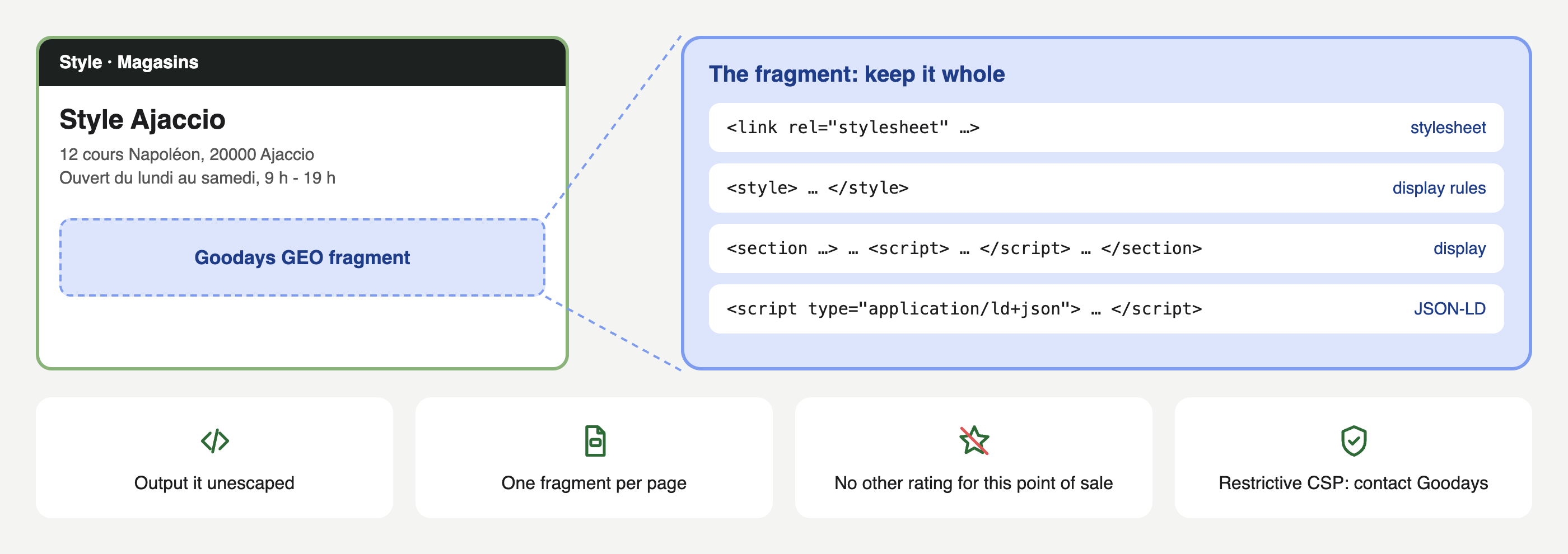
- Don't escape it. Template engines escape variables by default, so mark the fragment as safe HTML (see the table below).
- Render it on the server. Don't load it in an iframe or inject it with JavaScript after the page loads: crawlers would not see it.
- One fragment per page, for the point of sale the page is about.
- Keep the whole fragment and its order: the stylesheet
<link>, the inline<style>block, the<section>(including the inline script before the reviews) and the JSON-LD<script>. Don't move the script after the reviews or defer its execution: this ordering prevents all reviews from briefly appearing before the list is collapsed. If your page already hasAggregateRatingmarkup for the same point of sale, remove it so the two don't conflict. - When there is no fragment (timeout, error, unknown point of sale), render the page without the reviews block. Never output an error response body.
Content Security Policy (CSP)The fragment loads a stylesheet from
cdn.goodays.coand includes inline styles and a short inline script. If your website enforces a restrictive CSP, contact your Goodays project contact before integration so we can review compatibility and agree on the appropriate setup.
| Template engine | Unescaped output |
|---|---|
| Jinja (Flask), Django | {{ fragment|safe }} |
| EJS | <%- fragment %> |
| Handlebars | {{{fragment}}} |
| React (SSR, Server Components) | <div dangerouslySetInnerHTML={{ __html: fragment }} /> |
| Plain PHP | <?= $fragment ?> |
| Laravel Blade | {!! $fragment !!} |
| Twig (Symfony) | {{ fragment|raw }} |
<main>
  <h1>Style Ajaccio</h1>
  <!-- address, opening hours... -->

  {% if fragment %}
    <div id="reviews">{{ fragment|safe }}</div>
  {% endif %}
</main>
app.get('/stores/:slug', async (req, res) => {
const store = await findStore(req.params.slug); // your own data
const fragment = await getFragment(store.externalId); // string or null
res.render('store', { store, fragment }); // in store.ejs: <%- fragment %>
});<main>
<h1>Style Ajaccio</h1>
<!-- address, opening hours... -->
<?php if ($fragment !== null): ?>
<div id="reviews"><?= $fragment ?></div>
<?php endif ?>
</main>
Ready-to-use codeOur ready-to-use clients for Python, Node.js and PHP implement timeouts, local caching, ETag revalidation and fallback. Each page gives you the complete client code and examples for common frameworks. Before going to production, read Integration best practices.
Step 3: Customize HTML rendering (Optional)
By default, Goodays adapts the fragment to your website: we set up a stylesheet tailored to your brand guidelines, applied to every fragment of your account, with no work on your side. Your Goodays project contact handles it with you.
If you want to make other changes on your own, without going through Goodays, you can also override the fragment's CSS variables (colors, font, sizes, spacing) from your own stylesheet. See "Customize HTML rendering".
Step 4: Verify implementation
Run these two checks on a point of sale page once your integration is live.
Check 1: structured data (no technical skills needed)
- Open the Schema Markup Validator.
- Paste the URL of one of your point of sale pages and run the test.
- The result must show no error, and a LocalBusiness with the name of the point of sale, an aggregateRating with a ratingValue and a reviewCount, and a review list with one item per review of the fragment.
You can also open the page source in your browser (Ctrl+U, or Cmd+Option+U on Mac). Use the page source, not the inspector: the reviews must be visible there, because that is what AI crawlers read.
Check 2: what an AI crawler receives (technical)
Request your page the way a crawler does, without JavaScript and with an AI crawler user agent. The command below looks for the fragment's rating summary and its JSON-LD, and should print 2:
curl -s -A "GPTBot" "https://www.example.com/stores/ajaccio" | grep -oE 'class="goodays-summary"|"aggregateRating"' | grep -c ''If it prints 0, the fragment is not in the HTML your server returns: check that the API is called server-side and that the response is inserted unescaped.
Updated about 1 hour ago