
FAQ
Is Goodays GEO fragment API available for all clients?
Goodays GEO fragment API is available with your Goodays subscription, and it is not enabled by default. Reviews are published only once your company has agreed to their publication. Reach out to your Goodays project contact to activate it for your account. Once it is enabled, your Goodays project contact gives you your universe ID (one of your brands) and confirms the external IDs of your points of sale (your own codes).
What does the API return?
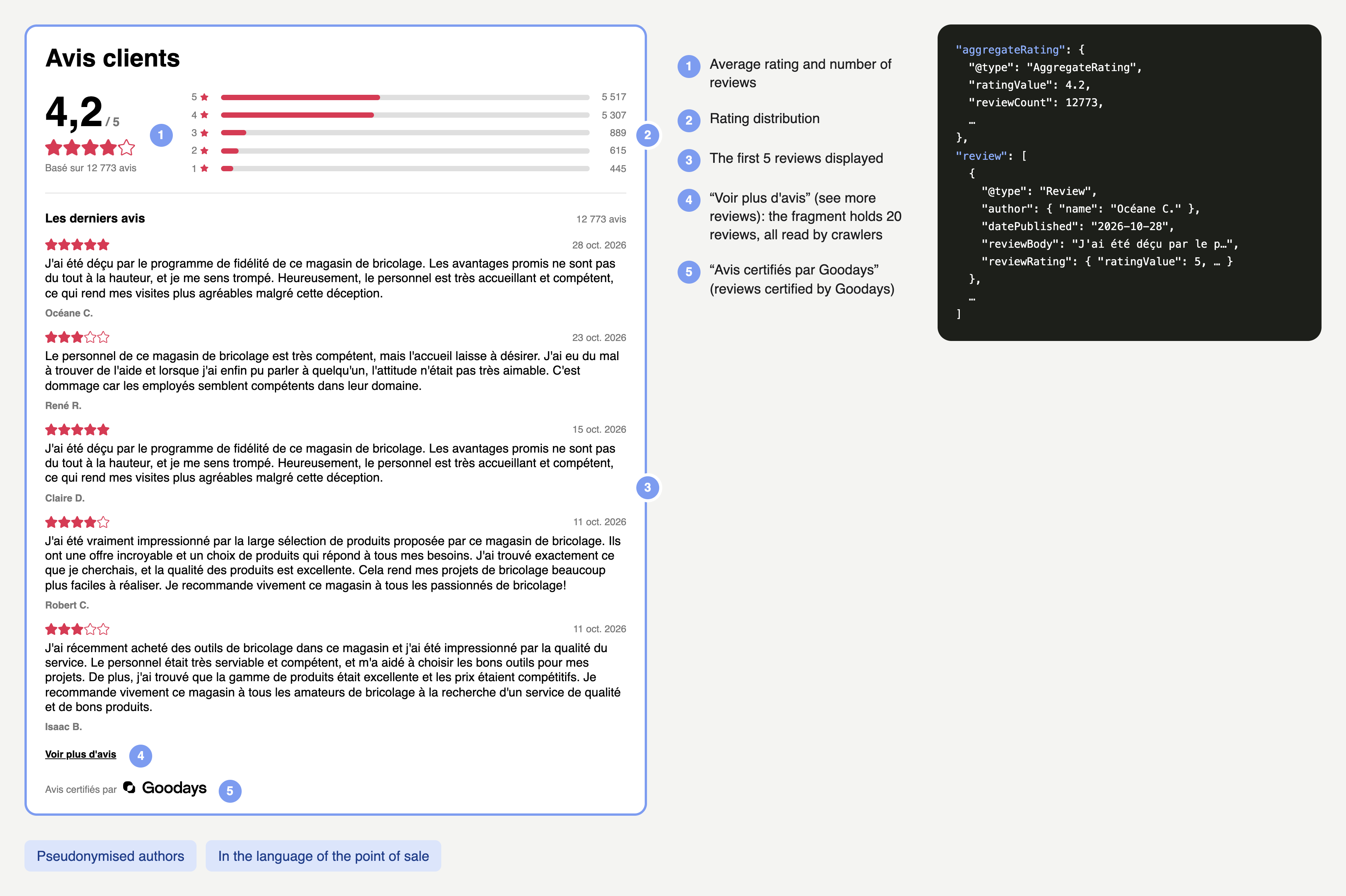
For one place, the API returns a ready-to-embed HTML fragment containing:
- a link to the fragment stylesheet, plus short inline styles and an inline script for the "See more reviews" button;
- a "Customer reviews" heading, in the language of the place;
- the rating summary: average score, number of reviews and rating distribution;
- the 20 latest published reviews that include a comment, with their rating, date, comment and the author's first name and last-name initial;
- a "See more reviews" button: the first 5 reviews are displayed and the others appear on click. All 20 reviews stay in the HTML, so crawlers read them all;
- a JSON-LD block that describes the point of sale as a
LocalBusinesswith its name, itsAggregateRatingand oneReviewper review, readable by search engines and AI assistants.
The average score, the number of reviews and the distribution take into account every star rating of the point of sale, with or without a comment.
The fragment is UTF-8 encoded and served with the text/html content type. See the sample response in the Integration guides.
Which reviews are published?
Only reviews solicited by Goodays that include a comment can be published, once your company has agreed to their publication. Goodays moderates them first. A review is not published when:
- its author asked for it not to be made public;
- it contains no actual feedback about an experience with your company, such as a question, a job application or unreadable text;
- it identifies a person, reveals private details, or discloses confidential or security information;
- it contains an insult or explicit profanity;
- it contains violent, hateful or explicitly sexual content, such as a threat or a discriminatory remark;
- it judges a person's physical appearance;
- it accuses a person or your company of serious wrongdoing, such as theft, fraud or assault;
- it promotes an offer, a website or another company, or contains a commercial solicitation.
How do I prevent this API from slowing down my website?
Never call the API on every page view:
- cache each fragment locally for 24 hours, and revalidate it with its
ETagwhen it expires; - set a 1-second connection timeout and a 2-second total timeout;
- on error, keep serving the last valid fragment, and wait 60 seconds before calling the API again;
- without any fragment, render the page without the reviews block.
With a cache in place, almost all page views are served without any network call. See Integration best practices, or use our ready-to-use clients for Python, Node.js and PHP.
Does the fragment work without JavaScript?
Yes. All reviews are present in the initial HTML. Without JavaScript, they all remain visible and the inactive toggle button is hidden, provided the styles are loaded and allowed by your site. With JavaScript enabled, the first 5 reviews are initially displayed and visitors can expand or collapse the rest.
Can I call the API from the browser?
No. AI crawlers don't execute JavaScript, so a fragment injected in the browser is invisible to them. The API doesn't send CORS headers, so browser calls are blocked anyway. Call it from your server and include the fragment in the HTML your server returns.
How often is the content refreshed?
Fragments are regenerated every 24 hours. The live=true query parameter disables caching for development, and the fragment then starts with a "Development preview" badge: never use it in production. Cache them for 24 hours on your side. When your copy expires, send its ETag in an If-None-Match header: the API answers 304 Not Modified if nothing changed.
What happens if a point of sale doesn't exist?
The API answers 404 with an XML error body. Never insert that body into your page: render the page without the reviews block. External IDs are case-sensitive, so aj-049 and AJ-049 would be two different points of sale. If you think a point of sale should exist, check its external ID with your Goodays project contact.
In which language is the fragment rendered?
Each fragment is rendered in the language of its point of sale: labels, dates and number formats. The lang attribute of the fragment's root <section> gives that language. Review comments are shown as written by your customers.
Can I change how the fragment looks?
Yes. By default, Goodays adapts the fragment to your website with a stylesheet tailored to your brand guidelines. If you want to make other changes on your own, the fragment also exposes CSS variables (colors, font, sizes, spacing) that you can override from your own stylesheet without !important. See Customize HTML rendering.
Will Google show star ratings for my point of sale pages?
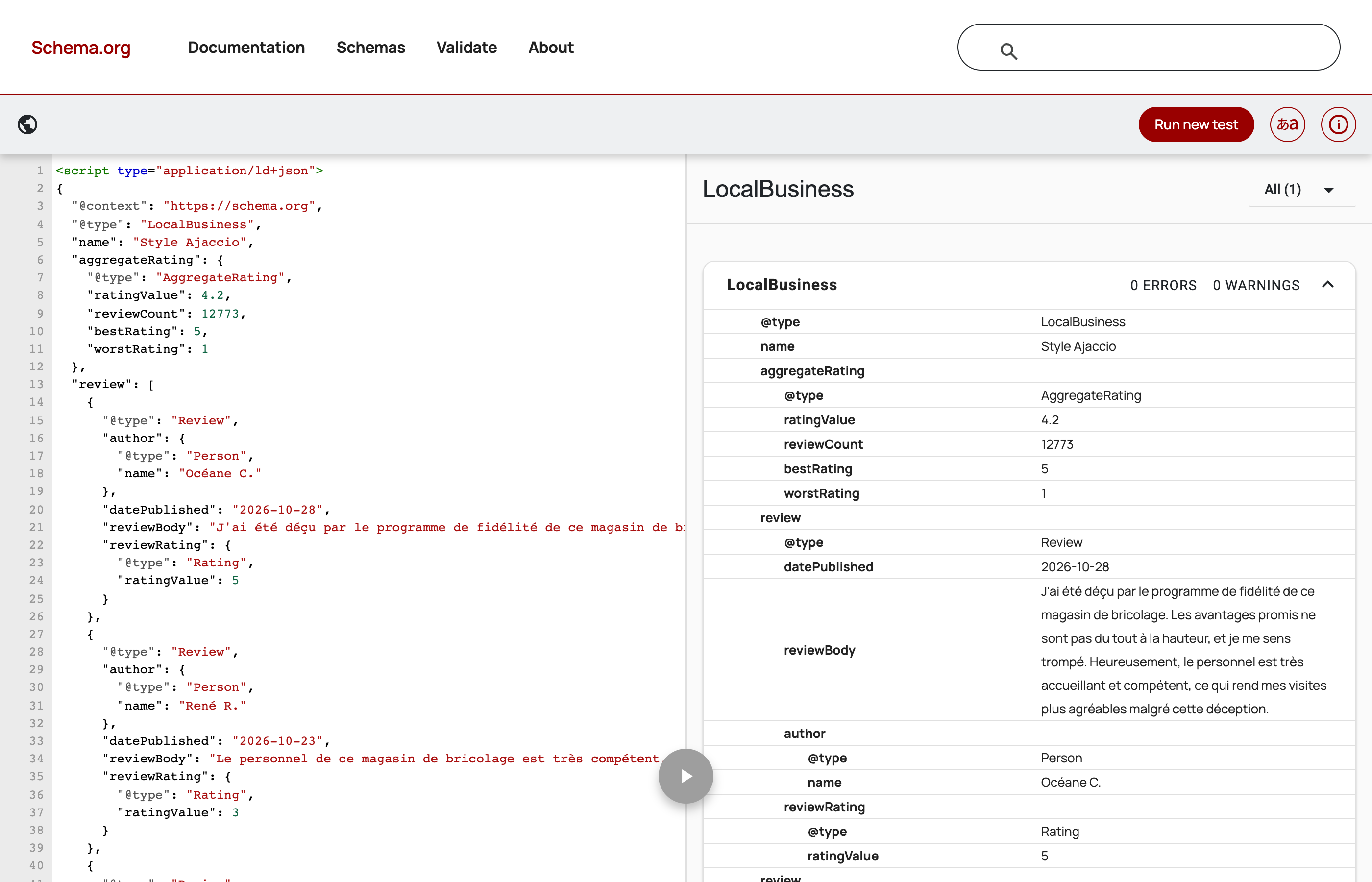
Not necessarily. Google doesn't display review stars for reviews a business publishes about itself on its own website (so-called "self-serving" reviews of a LocalBusiness or Organization). The structured data is still valid and useful: it describes your ratings unambiguously to search engines and AI assistants, which can use them in their answers. You can check its validity with the Schema Markup Validator, and see what Google can display with the Google Rich Results Test.
Updated 27 minutes ago